Mastering Loops in Python: For and While Loops
Mastering Loops in Python: For and While Loops
Python, one of the most popular programming languages, is known for its simplicity and versatility. One essential feature that makes Python powerful is its looping structures: for loops and while loops. Mastering these loops will elevate your Python programming skills and enable you to write efficient and concise code.
In this article, we’ll dive deep into the usage of for and while loops, explore their syntax, and understand how to harness their power for various applications.
What Are Loops in Python?
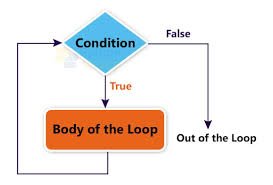
Loops are control flow statements that allow repetitive execution of a block of code. Instead of writing redundant code, you can loop through data structures or execute statements as long as a specific condition is met.
The for Loop in Python
The for loop is used to iterate over a sequence, such as a list, tuple, string, or range. It allows you to process each item in a collection one at a time.
Syntax of for Loop
for item in sequence:
    # Block of code
Example: Iterating Over a List
fruits = ["apple", "banana", "cherry"]
for fruit in fruits:
    print(fruit)
Output:
apple
banana
cherry
Using the range() Function
The range() function generates a sequence of numbers, often used with for loops.
for i in range(5):
    print(i)
Output:
0
1
2
3
4
Advanced Use Cases
- Nested
forLoops: Useful for iterating over multi-dimensional data structures.
matrix = [[1, 2], [3, 4]]
for row in matrix:
    for element in row:
        print(element)
- Using
enumerate(): Adds an index to items.
for index, fruit in enumerate(fruits):
    print(f"{index}: {fruit}")
The while Loop in Python
The while loop executes as long as a specified condition is True. It is ideal when the number of iterations is not known beforehand.
Syntax of while Loop
while condition:
    # Block of code
Example: Counting Down
count = 5
while count > 0:
    print(count)
    count -= 1
Output:
5
4
3
2
1
Potential Pitfalls: Infinite Loops
A common mistake is forgetting to update the condition, leading to infinite loops. Always ensure your loop has a termination condition.
count = 1
while count > 0:
    print("This will run forever!")
Combining Loops with Break and Continue
break: Exits the loop prematurely.continue: Skips the rest of the code for the current iteration.
Example: Break
for i in range(10):
    if i == 5:
        break
    print(i)
Output:
0
1
2
3
4
Example: Continue
for i in range(10):
    if i % 2 == 0:
        continue
    print(i)
Output:
1
3
5
7
9
Key Differences Between for and while Loops
| Feature | for Loop | while Loop |
|---|---|---|
| Iteration Control | Used for fixed iterations or sequences. | Used for condition-based iterations. |
| Termination | Automatically terminates after sequence. | Depends on the condition. |
| Readability | More concise for sequences. | Flexible but requires manual control. |
Real-World Applications
- Data Processing:
- Iterate over large datasets or files.
- Example: Reading lines from a file using
for.
- User Input Validation:
- Repeatedly prompt the user until valid input is received.
- Game Development:
- Maintain game loops with
whilefor constant gameplay logic.
- Maintain game loops with
- Automation:
- Use loops to automate repetitive tasks like web scraping or testing.
Conclusion
Mastering for and while loops in Python is a fundamental skill for any programmer. They empower you to handle repetitive tasks efficiently, making your code concise and elegant. Understanding when to use each loop and combining them with tools like break and continue will enhance your problem-solving abilities.
Practice these loops with real-world problems to truly grasp their power. Happy coding!